
Feature
Keep a current copy of every configuration
Fetch a .backup and a .rsc export from every selected device in one run. Each device gets its own folder; each stage is visible while it runs.

Two files per device, downloaded in one run
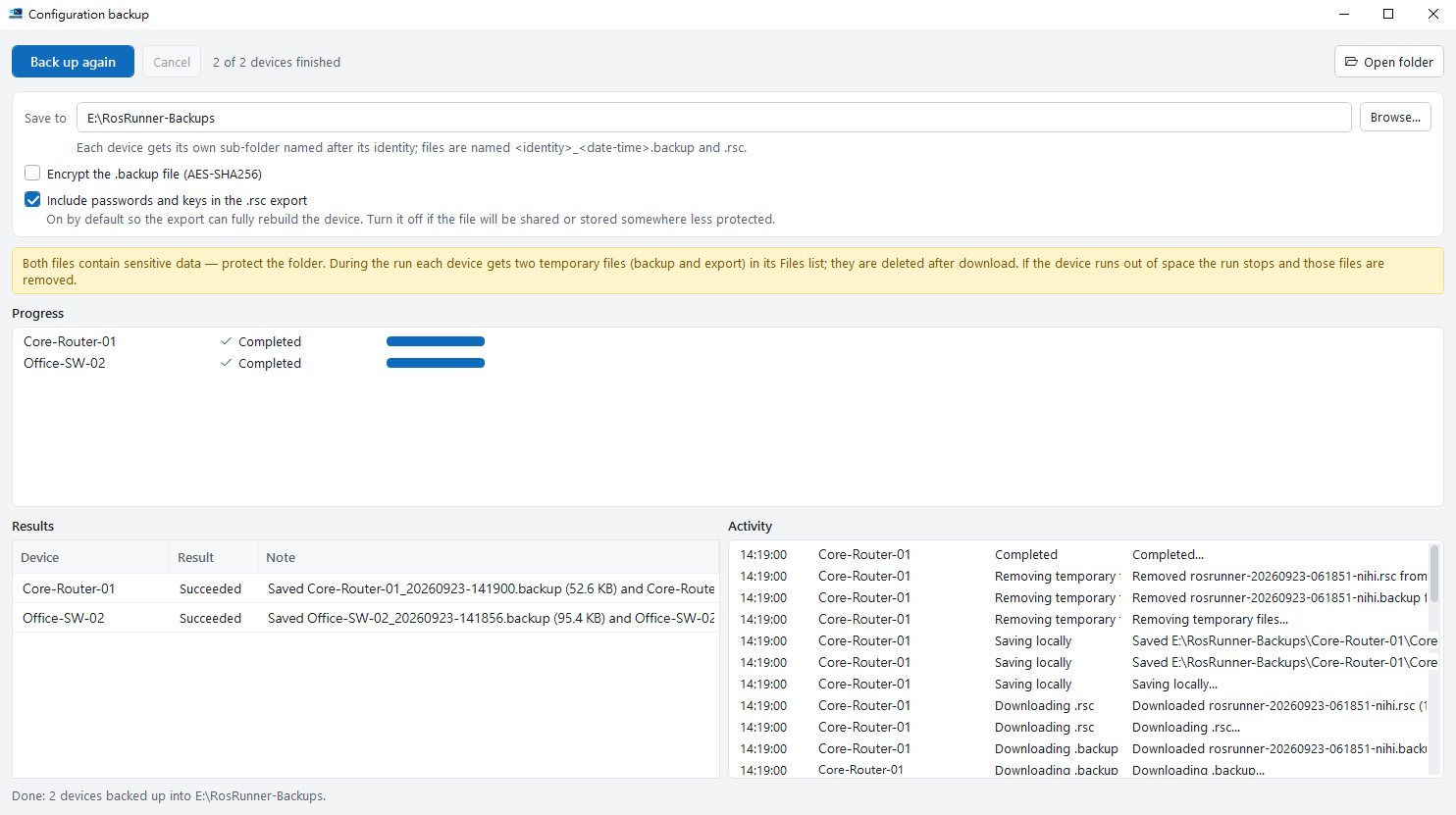
Select the devices in the device list, choose a folder, and start. The application creates the backup on each device, waits for the file to finish writing, downloads it, and removes the temporary copy from the device.
- Each device produces a .backup file (the RouterOS system backup) and a .rsc export (the readable configuration script). Both are saved under a sub-folder named after the device identity, with the date and time in the file name.
- Free space on the device is checked before anything is written. If a device runs out of space during the run, the run stops on that device and the files from that attempt are removed.
- Every stage is visible: a progress row per device, an activity log with one line per step, and a result table stating what was saved and where. Anything that could not be removed from a device is listed in the result, not left unmentioned.
- Encryption of the .backup file (AES-SHA256) is optional and off by default. The password is not stored anywhere; a .backup encrypted with a lost password cannot be restored.
- The .rsc export includes passwords and keys by default so that it can rebuild the device completely. Turn that off when the file will be shared or stored somewhere less protected. RouterOS 6 and 7 use opposite flags for this; the application applies the correct one for each version.
What happens on each device
The stages appear in this order in the progress table and the activity log. Names match those used in the application.
| Stage | What it does |
|---|---|
| Connecting | Opens the connection WinBox uses (port 8291) and signs in with the credentials from the device list |
| Checking free space | Reads the device identity and the free storage, and stops before writing if there is not enough room for a backup |
| Creating .backup | Runs the system backup on the device and waits until the file exists and its size has stopped changing |
| Exporting .rsc | Runs the configuration export to a file on the device, with or without sensitive values as selected |
| Downloading .backup / Downloading .rsc | Transfers both files to the computer running RosRunner |
| Saving locally | Writes the files into the device's sub-folder under the chosen backup folder |
| Removing temporary files | Deletes the two temporary files from the device. Files that could not be deleted are named in the result table |
Cancelling a run (Esc, or the Cancel button) stops the remaining stages and removes the temporary files from the devices where possible. Closing the window while a run is in progress asks for confirmation first.

Next: running a backup in practice
The documentation covers the folder layout, what the encryption and sensitive-value options do, what happens on the device at each stage, and what to do when a device fails.